

What Causes Flickering Under Cabinet Lights?
Share
What Causes Flickering Under Cabinet Lights?
Start with the pattern, not a replacement bulb. Flicker only at low brightness often points to a dimmer and LED compatibility issue. Every light in one kit blinking together points toward its shared power supply or control. One short section flickering while the rest stays steady points toward that fixture or an accessible connection. Flicker that also affects other household lights needs an electrician to investigate the circuit.
Stop using the lights and seek qualified electrical help if you notice a burning smell, sparking, a hot or discolored switch or outlet, a breaker that trips, or buzzing from household wiring. Electrical Safety Foundation International identifies flicker, buzzing, warmth, and discoloration as signs that warrant a qualified electrician's inspection. Do not open a live fixture, switch box, or wall outlet to look for a “loose wire.”
If there are no warning signs, the checks below help you separate a simple user-accessible problem from a driver, fixture, or electrical fault. The same sequence works for LED bars, strips, and pucks, but the next step depends on whether they are rechargeable, plug-in, or hardwired.
What Does the Flickering Pattern Tell You?
| What you see or hear | Likely place to investigate | First safe move |
|---|---|---|
| Only flickers or buzzes when dimmed | Dimmer, driver, or LED compatibility; sometimes an unstable low-end setting | Try full brightness without changing any wiring; check the model instructions. |
| All lights on one adapter blink together | Shared adapter/driver, overloaded kit, or shared controller | Switch off or unplug; confirm the kit has not been expanded beyond its stated limits. |
| One bar, puck, or strip section flickers | That fixture, its replaceable bulb, or its accessible low-voltage lead | Power off; inspect only user-accessible parts for damage or a loose plug. |
| Rechargeable light flashes or turns off early | Low charge, charging cable/contact, or battery/fixture fault | Charge it with the specified equipment and retest after it reaches full charge. |
| Under-cabinet and other room lights flicker together | Household circuit or supply, not just the cabinet light | Stop product troubleshooting and contact a qualified electrician. |
| Buzzing, heat, smell, or tripping | Possible electrical or component fault | Turn the system off; do not keep testing it or open the wiring. |
A pattern is a clue, not a diagnosis. For example, several lights flashing at once can reflect a failing adapter, but it can also follow an incompatible dimmer upstream. Use the safe checks to narrow the problem before buying a replacement.
Safe Checks to Make Before Replacing Anything
- Note when it happens. Does the light flicker at start-up, only after warming up, only when dimmed, or only when another appliance runs? Is it one fixture or every fixture on the same control? A short video can help a technician see an intermittent fault without keeping the system on for repeated tests.
- Identify the power route. A rechargeable bar, a plug-in kit, and a hardwired system have different user-accessible parts. Do not treat a hardwired box like a removable plug.
- Check the simple external power path. For a plug-in kit, turn it off and unplug it before checking that the adapter and user-accessible plugs are fully seated and undamaged. For a rechargeable light, use its specified charger and check whether a full charge changes the symptom. If a plug, cable, or adapter looks scorched, frayed, or unusually hot, stop using it.
- Test the control setting. If the fixture is dimmable, compare full brightness with the lowest setting. Flicker that appears only at one dim level suggests a control or compatibility question. Check the exact fixture, driver, and dimmer instructions; do not bypass or rewire the dimmer as a test.
- Compare sections. With power off, look for an obviously loose or damaged user-accessible low-voltage connector on the affected section. Follow the manufacturer's instructions for reseating or replacing detachable parts. Leave concealed and line-voltage connections closed for a qualified person.
- Stop when the evidence points upstream. If multiple room lights flicker, the breaker trips, or the problem remains after the safe checks, arrange professional diagnosis rather than trying a series of random adapters and fixtures.
Do not keep turning a suspect light on and off to “see if it clears.” Intermittent flicker can be hard to locate; record the pattern and leave a potentially faulty system off.
Common Causes, from the Light Back to the Power Source
Bulb or integrated LED fixture
If just one replaceable bulb flickers, use a bulb of the type and rating specified for that fixture. Check whether it is actually dimmable when a dimmer is present. Many modern bars and strips have integrated LEDs rather than a user-replaceable bulb; in those cases, a failing light section may need a manufacturer-approved part or a new fixture, not a generic bulb.
Dimmer, sensor, or controller
If flicker or hum appears only when dimmed, the LED, driver, and control may not work well together. Lutron's LED-dimmer troubleshooting guidance describes low-end flicker, buzzing, and drop-out caused by incompatible lamps or dimming range settings. Its specific settings apply to its products, not to every Lumaz system. Check your own model instructions or ask the installer about compatible controls.
Plug-in adapter or low-voltage driver
A shared supply is suspect when all sections on that supply blink together or repeatedly restart. Heat, damage, age, or adding more lights than the kit supports can contribute. A replacement must match the fixture's required voltage, capacity, connector, polarity, and any dimming method; a similar-looking plug is not proof of compatibility. If the driver is hardwired or concealed, have a qualified electrician or installer assess it.
Connection or household circuit
An accessible low-voltage plug can sometimes work loose; a damaged cord, hidden splice, switch, or household circuit is different. Do not open electrical boxes or tighten live connections. If other lights change brightness when a large appliance starts, or a switch buzzes or feels warm, stop and have the circuit checked. The cause may be outside the under-cabinet fixture.
For a more detailed discussion of driver aging and long-term maintenance, see Living with Under Cabinet Lighting. This page stays focused on diagnosing the current flicker.
What If the Lights Buzz as Well as Flicker?
First locate the sound without opening anything. A faint hum that appears only when a dimmable LED is set very low may point to the control/driver combination. A newly loud buzz from a switch, outlet, junction area, or adapter—especially with heat, smell, or visible damage—is a reason to switch the system off and get help. Do not assume all buzzing is harmless simply because the light still turns on.
Test only ordinary user controls, such as moving a compatible dimmer to full brightness. If the sound changes, note the setting and product models for the installer. The fix may be a supported dimming adjustment or a compatible component, not a new light fixture. If the sound persists at full brightness or comes from household wiring, stop troubleshooting it yourself.
When to Repair, Replace, or Call an Electrician
- Keep the fixture when a full recharge, a firmly seated detachable plug, a correct replaceable bulb, or a manufacturer-supported dimmer setting resolves the issue and no damage is present.
- Replace a component when a qualified diagnosis identifies a failed adapter, driver, controller, or light section and a correctly specified replacement is available.
- Replace the lighting system when an integrated fixture is failing, compatible parts are unavailable, or the old layout does not meet the job anymore. Do not replace a product to mask a suspected wiring fault.
- Call a qualified electrician for hardwired faults, repeated breaker trips, warm or discolored switches, buzzing from boxes, or flicker shared with other household lights.
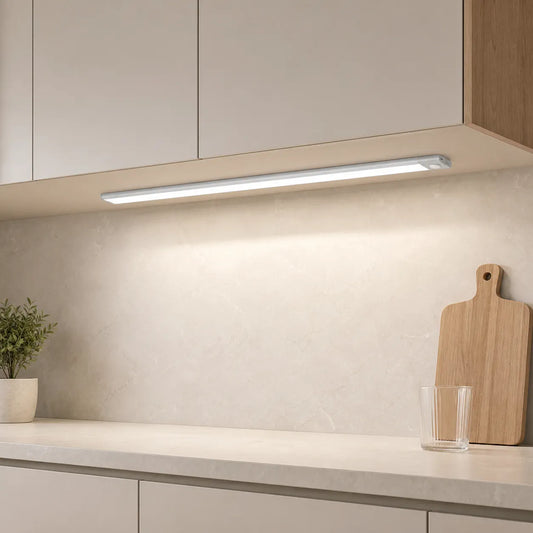
If a plug-in bar itself has failed and the existing outlet and cord route are suitable, Lumaz's Touch & Hand Sweep Sensor Under Cabinet LED Light Bar - No-Drill, 7mm Ultra-Thin is one possible replacement format. It comes as a plug-in kit with adapter and touch/hand-sweep control; check the chosen length, plug type, and kit size. It cannot fix a faulty outlet, unsafe wiring, or an incompatible external dimmer. A product swap belongs after the cause is understood, not at the start of troubleshooting.
Frequently Asked Questions
Are flickering LED under-cabinet lights dangerous?
Not every instance means a dangerous fault: a dimmer compatibility problem or a low rechargeable battery can also cause visible flicker. But persistent flicker, especially with a hot switch, buzzing from wiring, burning smell, damage, or breaker trips, should be treated as an electrical warning and checked by a qualified professional.
Why do my dimmable under-cabinet lights flicker only when turned down?
The LED, driver, and dimmer may not share a stable low-end range. Try the normal full-brightness setting, then check the exact product compatibility and manufacturer-supported adjustment. Do not assume that a bulb marked “dimmable” works with every dimmer.
What does it mean when under-cabinet lights flash on and off?
Repeated flashing can come from a low rechargeable battery, a supply that is restarting, a controller fault, or a damaged connection. If all lights on one kit flash together, look toward shared power or control; if other room lights do it too, contact an electrician.
Should I keep using a light that flickers only occasionally?
Record when it occurs and make the non-invasive checks above. Do not ignore a recurring problem or keep using a light that develops heat, a smell, a loud buzz, or other warning signs. Intermittent faults can still need professional diagnosis.
Bottom line: match the symptom to the section and power source first. Check only the controls, charging equipment, plugs, bulbs, and detachable low-voltage parts the manufacturer makes accessible. Leave concealed wiring, hardwired drivers, and household-circuit faults to a qualified professional.
Related articles
- Living with Under Cabinet Lighting — long-term driver care and maintenance.
- How Long Do LED Under Cabinet Lights Last? — distinguish normal aging from failure.
- Do LED Under Cabinet Lights Get Hot? — understand normal warmth and warning signs.

















 />
/>
 />
/>
 />
/>
 />
/>
 />
/>