

How Motion Sensors Transform Under Cabinet Lighting: Hands-Free Control and Efficiency
Table of Contents
- Introduction: Understanding Motion Sensors in Under Cabinet Lighting
- How Motion Sensors Work in Under Cabinet Lighting
- Benefits of Using Motion Sensors in Under Cabinet Lighting
- Choosing the Right Motion Sensor for Your Under Cabinet Lighting
- Best Placement for Motion Sensors in Under Cabinet Lighting
- Common Applications for Motion Sensors in Under Cabinet Lighting
- Enhancing Convenience: Automation with Motion Sensors
- Troubleshooting Motion Sensors in Under Cabinet Lighting
- Real-World Examples: Motion Sensors in Action
- Choosing the Best Motion Sensor-Powered Under Cabinet Lighting Solution
- Frequently Asked Questions (FAQs)
- Conclusion: The Future of Motion Sensors in Under Cabinet Lighting
Introduction: Understanding Motion Sensors in Under Cabinet Lighting
Motion sensors switch light on when people approach and off when spaces are idle. Under-cabinet runs gain hands-free convenience, calmer nights, and measurable energy savings.
Sensors complement dimmers and scenes, making guidance automatic near sinks and paths while preserving low-glare comfort.
How Motion Sensors Work in Under Cabinet Lighting
Sensors detect movement or presence and trigger lighting logic. Common types include PIR, microwave, and multi-sensor presence; each balances sensitivity, range, and false-trigger risks.
Sensor types
| Type | Trigger Basis | Typical Range | False Trigger Risk | Best Placement | Notes |
|---|---|---|---|---|---|
| PIR | Heat + motion | Short–medium | Low–moderate | Facing approach paths | Reliable, resistant to RF noise |
| Microwave | Doppler motion | Medium–long | Moderate–high | Avoid thin-wall oversensing | Penetrates some materials; tune carefully |
| Presence (multi-sensor) | Fusion of PIR + ambient + algorithms | Short–medium | Low | Focused task zones | Accurate occupancy, fewer nuisance offs |
Trigger logic
- On when motion/presence is detected within defined zones.
- Off after adjustable delay (e.g., 30–120 seconds) when no activity.
- Ambient light thresholds prevent daytime over-lighting.
Latency and power
- Local sensor triggers typically feel instant; verify controller response.
- Low standby designs minimize phantom loads in smart setups.
- Combine with dimmers for stable low-end at night scenes.
For foundational lighting research and guidance, reference RPI Lighting Research Center.
Benefits of Using Motion Sensors in Under Cabinet Lighting
Motion sensors reduce runtime and remove the need to touch switches. They improve safety and maintain comfort with gentle low-level guidance.
Energy savings
- Evening scenes at ~30% plus occupancy control substantially cut kWh.
- Idle shutoff reduces unnecessary runtime in pantries and utility areas.
- Ambient thresholds disable output when counters are already bright.
Convenience and safety
- Hands-free operation with wet or busy hands near sinks.
- Night guidance reduces trips and glare-related discomfort.
- Consistent scenes across fixtures simplify daily routines.
Longevity
- Lower average output extends LED and driver life.
- Fewer hard on/off cycles reduce thermal stress.
- Measured runtime logs help plan maintenance windows.
Choosing the Right Motion Sensor for Your Under Cabinet Lighting
Select by space geometry, tasks, and desired sensitivity. Favor accurate presence detection for prep zones; use PIR for sinks and microwave cautiously for long corridors.
Selection criteria
- Detection method (PIR, microwave, presence) and false-trigger profile.
- Range and field of view matched to cabinet depth and approach path.
- Adjustable delay and ambient light thresholds for scene coordination.
Specification checklist
- Voltage and control type compatibility (PWM/TRIAC/ELV/0–10V).
- Mounting form factor and cable management under cabinets.
- IP/GFCI considerations near wet areas.
Compatibility notes
- Pair sensors with controllers that support local triggers.
- Keep one control technology per run for stable dimming.
- Test minimum levels to avoid shimmer at low brightness.
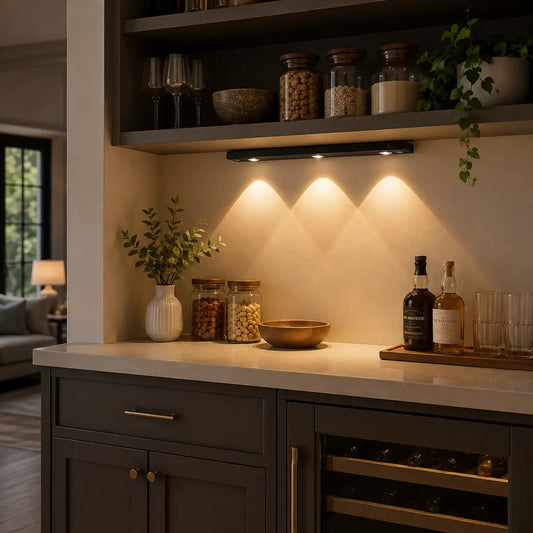
For a more tailored experience, consider the Type-C Rechargeable Under Cabinet LED Light Bar with a Smart Motion Sensor. Its versatile 3-color settings adapt to various tasks, ensuring the perfect lighting for every moment, from cooking to cleaning. The motion sensor reacts instantly, providing hands-free convenience when you're engaged in kitchen tasks, without the need for manual switches.

Best Placement for Motion Sensors in Under Cabinet Lighting
Placement governs sensitivity and comfort. Mount to view approach paths, not windows or reflective backsplashes, and set delays longer near sinks.
Placement rules
- Front edge or corner alignment to capture entry motion.
- Avoid direct view of pets or busy corridors to reduce false triggers.
- Use diffusers to soften output in immediate proximity.
Coverage and angles
- Match sensor cone to counter geometry.
- Validate coverage with walk tests in day and night conditions.
- Adjust tilt to minimize glare and maximize detection.
False-trigger avoidance
- Limit microwave sensitivity near thin partitions.
- Trim PIR sensitivity where sunlight or reflections occur.
- Prefer presence detection for long prep tasks.
Common Applications for Motion Sensors in Under Cabinet Lighting
Use motion near sinks, prep zones, and paths; tailor thresholds by space. Offices and pantries benefit from occupancy-based guidance that avoids unnecessary output.
Kitchen
- Sink and pathway guidance with PIR or presence sensors.
- Evening scenes at low output for calm meals.
- Ambient light input to bypass daytime triggers.
Bathroom
- Low-level night guidance under vanities.
- Presence detection reduces nuisance off during grooming.
- Check IP ratings and proximity to water sources.
Home office
- Presence extends guidance during focused work.
- Neutral task scenes minimize glare on screens.
- Ambient thresholds prevent over-lighting near windows.
Pantry and corridors
- Motion with longer delays for short chores.
- Microwave cautiously for extended coverage.
- Use diffusers to avoid bright hotspots in tight spaces.
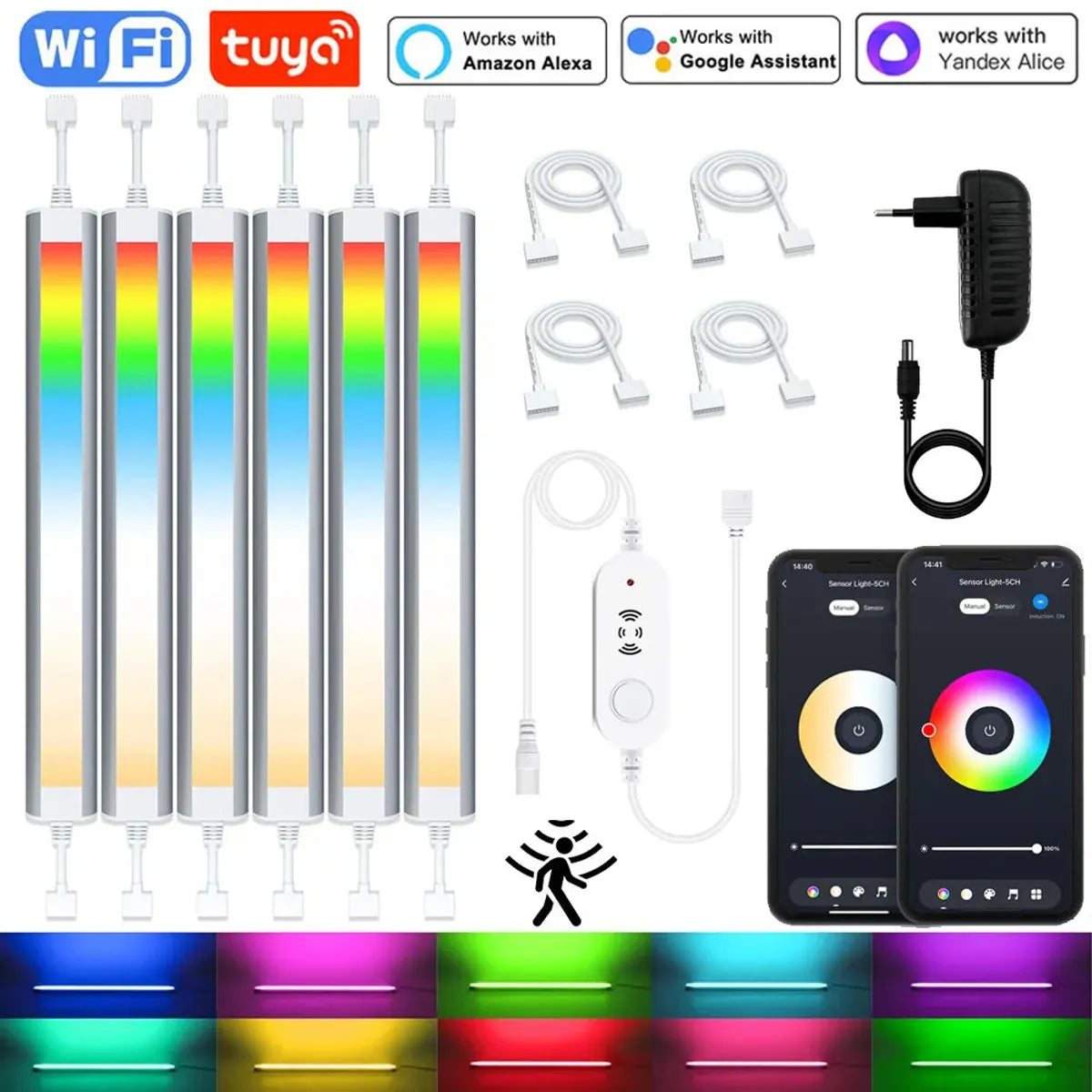
Motion sensors work well in areas like sinks, prep zones, and paths, offering hands-free convenience. In offices and pantries, they help save energy by activating only when needed. The 12V Tuya WiFi Under Cabinet LED Light Bar with RGBCCT dimming and motion sensing adapts to your needs, providing efficient lighting when you’re nearby.
Enhancing Convenience: Automation with Motion Sensors
Automation aligns motion triggers with scenes and schedules. Local logic keeps response fast and consistent, while ambient inputs prevent daytime over-lighting.
Scene integration
- Prep: neutral, brighter output for clarity.
- Evening: warm, low output for comfort.
- Night: very low guidance near sinks and paths.
Threshold tuning
- Set ambient thresholds to bypass triggers when counters are bright.
- Adjust delays longer near sinks to reduce rapid toggling.
- Calibrate sensitivity to minimize pet-triggered activations.
Platform notes
- Favor local automations for fast response.
- Keep scene names short and distinct for voice consistency.
- Group fixtures by zone (Prep, Sink, Path) rather than by brand.
💡 Lumaz stands for effortless, comfortable spaces—motion‑tuned guidance, low‑glare scenes, and reliable local control that respects your routine.
Troubleshooting Motion Sensors in Under Cabinet Lighting
Most issues stem from sensitivity, delay, or placement. Validate coverage, adjust thresholds, and retest under different conditions.
No-trigger diagnosis
- Check power, wiring, and sensor orientation.
- Verify detection range and unobstructed line of sight.
- Increase sensitivity or adjust angle to view approach paths.
Over-trigger mitigation
- Reduce sensitivity near windows or reflective surfaces.
- Shorten detection cone; reposition away from busy corridors.
- Use presence sensors for long tasks to avoid nuisance offs.
Interference and environment
- Microwave sensors can oversense through thin materials—tune carefully.
- Strong sunlight may affect PIR—angle and shade appropriately.
- Ambient inputs should reflect true counter brightness.
🙂 “We mounted a discrete PIR near the sink. Nights feel safer, and the light is never harsh—one less thing to think about during cleanup.”
Real-World Examples: Motion Sensors in Action
Households tune motion differently by space. These examples show practical scenes, delay settings, and sensor choices that balance comfort and efficiency.
Kitchen sink guidance
- PIR with 60–120 s delay; ambient threshold to bypass daytime.
- Night output at very low levels to reduce glare.
- Diffusers ensure uniform illumination over wet surfaces.
Open-plan evening scene
- Presence sensors in prep zones for accurate occupancy.
- Warm, low‑glare output coordinated with ambient layers.
- Manual scene override for cooking bursts.
Office under-shelf lighting
- Presence detection extends guidance during focused sessions.
- Neutral task brightness avoids screen reflections.
- Ambient thresholds limit daytime over‑lighting near windows.
Choosing the Best Motion Sensor-Powered Under Cabinet Lighting Solution
Choose sensors by space, desired comfort, and control method. Favor local response, consistent color temperature, and matched dimmer/driver technologies.
Selection matrix
| Priority | Recommended Sensor | Placement | Delay | Notes |
|---|---|---|---|---|
| Sink guidance | PIR | View approach path | 60–120 s | Ambient threshold to bypass daytime |
| Long prep tasks | Presence | Focused prep zone | 120–180 s | Accurate occupancy, fewer nuisance offs |
| Extended coverage | Microwave | Away from thin walls | 60–120 s | Tune sensitivity to prevent oversensing |
Action checklist
- Align sensor type to space and comfort goals.
- Set ambient thresholds; verify counters are not over‑lit.
- Trim low‑end dimmer minimums for flicker‑free night scenes.
Frequently Asked Questions (FAQs)
Will motion sensors be annoying in busy kitchens?
Tune sensitivity and delays; use motion at sinks/paths and presence in prep zones to avoid rapid toggling.
Can motion sensors work without the internet?
Yes. Local sensors and controllers trigger lighting autonomously; cloud features are optional convenience layers.
How do I avoid false triggers?
Mount away from windows and reflective surfaces, trim sensitivity, and set ambient thresholds to bypass daytime scenes.
What brightness should I use at night?
Use very low output with diffusers to avoid glare; verify flicker‑free low‑end by adjusting dimmer minimums.
Do motion sensors increase energy savings?
Yes. Idle shutoff and reduced evening output lower runtime and kWh; confirm gains via logs or smart plugs.
Conclusion: The Future of Motion Sensors in Under Cabinet Lighting
Motion sensors make under‑cabinet lighting responsive and calm. With tuned sensitivity, delays, and ambient thresholds, guidance appears when needed and disappears when not.
Action plan
- Choose sensor type per zone; validate coverage with walk tests.
- Coordinate scenes and schedules; prefer local automations.
- Monitor runtime to confirm savings and adjust thresholds.
Further Reading
Explore the full guide for this topic: Complete Guide to Smart Under Cabinet Lighting: Controls, Sensors & Automation














 />
/>
 />
/>
 />
/>
 />
/>
 />
/>