

How to Control and Dim Puck Lights: Remote, Smart Switches, and Voice Assistants
Puck lights can be controlled by tap-to-toggle, handheld remotes, wall dimmers, apps, and voice assistants. The right choice depends on power type, dimming support, and how often you adjust brightness.
Table of Contents
- What Control Options Are Available for Puck Lights?
- Manual Control vs Remote Control: Which Is Right for Your Setup?
- How Remote-Controlled Puck Lights Work (IR vs RF)
- Dimming Puck Lights: Brightness Control Methods Explained
- Are Puck Lights Compatible with Wall Dimmer Switches?
- Smart Puck Lights: What Makes a Puck Light “Smart”?
- Connecting Puck Lights to Smart Home Systems (Alexa, Google, HomeKit)
- App Control vs Voice Control: Everyday Use Scenarios
- Smart Automation Ideas for Puck Lights
- Power Source Considerations for Controlled and Smart Puck Lights
- Common Control Issues and How to Fix Them
- Safety and Reliability When Using Remotes and Smart Controls
- Choosing the Best Control Option for Your Space
- FAQs About Controlling and Dimming Puck Lights
- Final Thoughts: Making Puck Light Control Simple and Scalable
What Control Options Are Available for Puck Lights?
Puck lights are commonly controlled by on-device buttons, handheld remotes, wall controls, apps, and voice assistants. The fastest way to choose is to map your power type (battery, plug-in, or hardwired) to the control method it actually supports.
A practical “control landscape” for puck lights
- On-device control: press or touch the puck housing to toggle, cycle modes, or dim.
- Remote control: IR or RF remotes that send commands to the lights or a receiver/controller.
- App control: Bluetooth, Wi‑Fi, or hub-based control using a phone app.
- Voice control: Alexa/Google/Siri triggers through an app or smart-home integration.
Quick rule before you compare features
- If your puck is battery-powered and self-contained, the most reliable control is usually on-device or a bundled remote.
- If your puck is plug-in/low-voltage with a driver or hardwired, you can often control and dim at the driver/controller level, but only when the electronics support that dimming method.
Manual Control vs Remote Control: Which Is Right for Your Setup?
Manual control is simplest and most reliable, while remote control is more convenient for multi-light setups and hard-to-reach locations. Choose based on access: if you can’t comfortably reach the puck, you’ll use a remote (or app) more consistently.
Manual control is usually best when
- You have 1–2 lights and they are easy to reach (small display shelf, short cabinet run).
- You prefer zero setup and want a dependable “anyone can use it” solution.
Remote control is usually best when
- You’re controlling multiple puck lights across a run of cabinets or a closet wall.
- The lights are in awkward locations or you want dimming/timers without touching each puck.
Answering the common question: “Do I need a remote for puck lights?”
You don’t need a remote if you can reach the lights and rarely change brightness. You probably do if the lights are daily-use task lighting or you’re controlling a group.
💬 “I thought a remote was optional, but once the lights were under the upper cabinets, tapping each one got old fast. A single remote made them feel like a real lighting layer.”
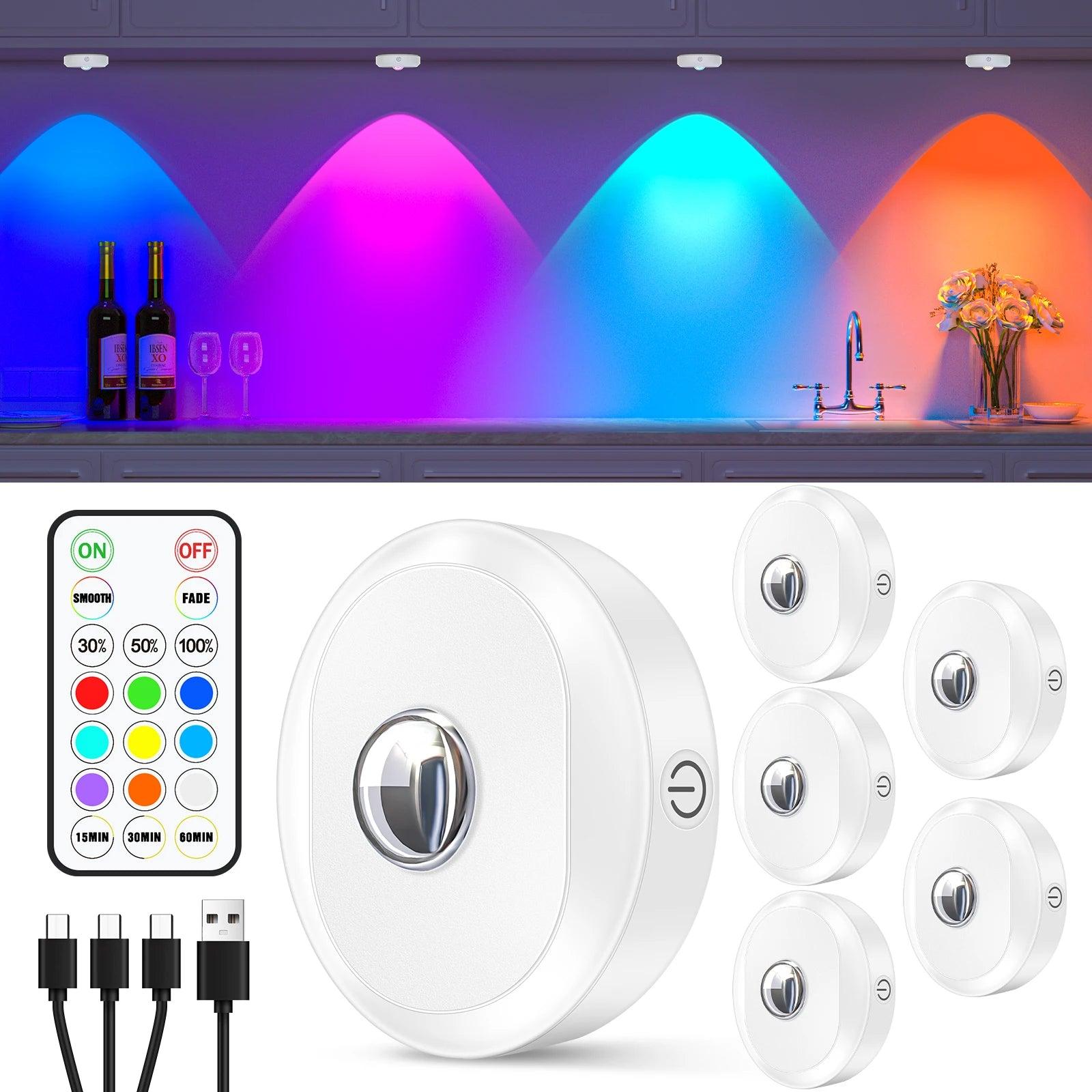
For users managing multiple puck lights or installing them in higher or deeper cabinets, remote control can make daily use far more practical. A 6-pack of rechargeable RGB under cabinet LED puck lights with both remote and touch control allows easy access for quick adjustments while still offering hands-on control when the fixtures are within reach.
How Remote-Controlled Puck Lights Work (IR vs RF)
Most remote puck lights use either infrared (IR) signals that require line-of-sight, or radio frequency (RF) signals that can work through obstacles. The difference matters most in cabinets, closets, and corner installs where “aiming” a remote is annoying.
IR vs RF remote control at a glance
| Attribute | IR Remote | RF Remote |
|---|---|---|
| Line of sight needed | Yes (usually) | No (usually) |
| Typical usability | Best in open view | Better in cabinets/closets |
| Range | Often shorter and angle-sensitive | Often longer and less angle-sensitive |
| Interference risk | Low, but blocked by objects | Can be impacted by distance/walls and nearby RF devices |
| Pairing complexity | Often none | Sometimes pairing required |
| Best fit | Simple single-zone control | Multi-light or hard-to-reach installations |
RF remotes generally operate as unlicensed radio devices in the U.S. under FCC rules (FCC overview: https://www.fcc.gov/engineering-technology/laboratory-division/general/equipment-authorization), so range and reliability vary by design.
Decision rule you can use in 10 seconds
- Choose IR if you’ll be controlling lights in open view and you want the simplest behavior.
- Choose RF if the lights are behind doors, inside cabinets, around corners, or you want control from across the room.
Dimming Puck Lights: Brightness Control Methods Explained
Puck lights dim in a few distinct ways: step dimming, smooth (continuous) dimming, wall-dimmer-based dimming, or app-based dimming through a controller. The key is that “dimmable” can mean very different experiences depending on the electronics.
Common dimming methods (what they really mean)
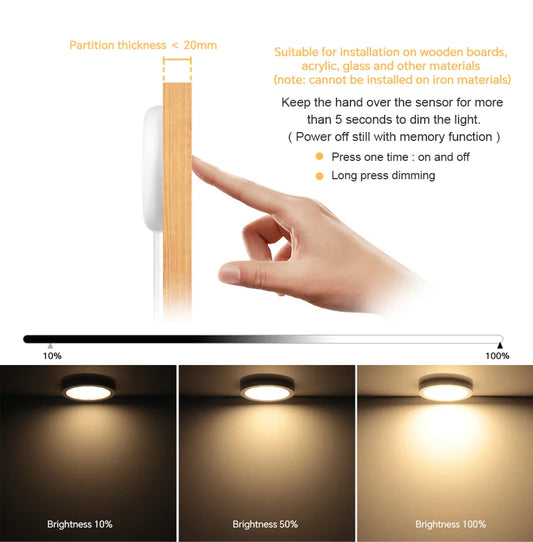
- Step dimming: cycles through fixed brightness levels (for example: 100% → 50% → 20%). Predictable, but not fine-tunable.
- Smooth dimming: lets you choose many levels (often via long-press, remote hold, or slider in an app).
- Wall dimmer (AC-side): works only when the puck/driver is designed for a compatible dimmer signal.
- Controller dimming (DC-side): an inline controller changes the output to the pucks (often more reliable for low-voltage systems).
The most common “dimming” mismatch that causes returns
- The listing says “dimmable,” but the product only supports step dimming via its remote, not a wall dimmer.
- The pucks use a driver/controller, but dimming is attempted on the wrong side of the system, causing flicker or dropouts at low brightness.
For deeper context on LED behavior at low output and why flicker can appear, the Lighting Research Center at Rensselaer Polytechnic Institute is a good reference (LRC, RPI: https://www.lrc.rpi.edu/).
Are Puck Lights Compatible with Wall Dimmer Switches?
Some puck lights work with wall dimmers, but many do not because of how they’re powered and controlled. Compatibility depends on the driver design, whether dimming happens on AC input or DC output, and the dimmer type the system expects.
Why many puck lights don’t work with traditional dimmers
- Low-voltage architecture: many puck systems use a driver that converts household AC to low-voltage DC; a standard wall dimmer may confuse or starve the driver.
- Non-dimmable driver: even if the LEDs could dim, the included driver may only support on/off.
- Dimming method mismatch: some systems require 0–10V, PWM, DALI, or a proprietary controller rather than phase-cut dimming.
A fast compatibility checklist
- Confirm whether the system is hardwired AC, plug-in with driver, or battery.
- Look for explicit language like “dimmable with TRIAC/ELV dimmer” or “0–10V dimmable”.
- If the listing only says “remote dimmable”, assume wall dimming is not supported.
- When in doubt, prefer controller dimming for low-voltage puck systems.
Smart Puck Lights: What Makes a Puck Light “Smart”?
A puck light is “smart” when it can be controlled and automated through a networked system, not just a handheld remote. Smart typically means app control plus automation features, and often voice control through Alexa/Google/Siri.
Use this definition to avoid confusion
- Remote-controlled: a handheld remote changes on/off, brightness, or color; no network awareness.
- App-controlled: a phone app connects to the lights or a hub (Bluetooth/Wi‑Fi/Zigbee).
- Smart-home integrated: the system supports automation, grouping, and voice triggers through a platform.
Smart features that matter in real life
- Reliable grouping: zones/rooms that stay consistent after power cycles.
- Scenes: one tap to set multiple lights to specific brightness levels.
- Schedules: predictable on/off and brightness behavior without thinking.
💡 Lumaz perspective: Smart control should reduce friction, not add it. If a system breaks after a router change, a dependable RF remote with solid dimming can be the better everyday choice.
Connecting Puck Lights to Smart Home Systems (Alexa, Google, HomeKit)
Most puck lights connect to voice assistants through one of three paths: native integration in the puck system’s app, a smart plug/smart switch controlling power, or a hub/controller that exposes the lights to your platform. The “right” path depends on whether you need dimming and scenes, or only on/off.
The three most common connection methods
- Native integration: the brand’s app links to Alexa/Google (and sometimes HomeKit) so you can control brightness and scenes.
- Smart plug or smart switch: turns the puck system on/off at the outlet or wall switch level; usually does not provide smooth dimming.
- Smart hub/controller: a Zigbee/Z‑Wave hub or dedicated controller manages the puck lights and exposes them to your voice platform.
Platform expectations (without marketing hype)
Alexa and Google Home tend to support more third-party devices. HomeKit usually works best when a device is explicitly certified or bridged through a compatible hub.
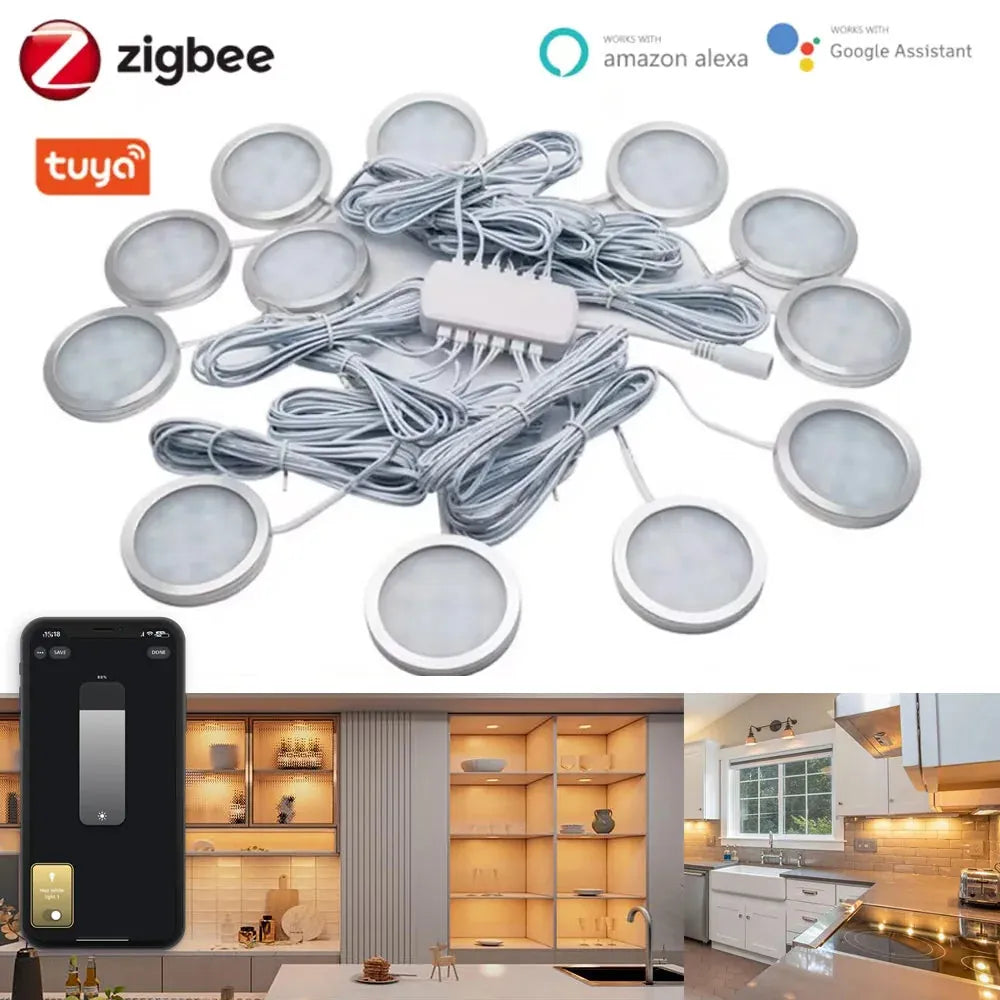
For users who want full voice control without relying on smart plugs or extra adapters, a native smart puck system simplifies integration. Tuya Zigbee Smart Under Cabinet LED Puck Lights (12V, full kit) connect through a hub to enable direct app and voice control, making it easy to manage dimming, scenes, and grouped lighting across cabinets or displays.
App Control vs Voice Control: Everyday Use Scenarios
App control is best for configuration and automation, while voice control is best for quick, frequent adjustments. Most people end up using both: app for setup, voice for daily life.
When app control wins
- Initial setup: naming rooms, pairing devices, setting scenes.
- Automation: schedules, timers, and routines that run without you.
When voice control wins
- Hands full: cooking, carrying laundry, cleaning.
- Quick adjustments: “dim to 20%” or “turn on under-cabinet lights.”
Smart Automation Ideas for Puck Lights
Automation makes puck lights feel “built-in” because they behave like a lighting layer, not a gadget. The best automations are predictable, reversible, and designed around real routines.
High-value automations people actually keep
- Time-based dimming: bright for cooking, medium for dinner, low as a nightlight.
- Occupancy-driven lighting: motion sensor triggers in pantry or closet with a short auto-off.
- Safety routine: hallway or stair lights turn on to a low level after sunset.
Automation rule that prevents battery regret
If the pucks are battery-powered, avoid long “always on” schedules and rely on timers or occupancy triggers to reduce drain.
Power Source Considerations for Controlled and Smart Puck Lights
Power type quietly dictates what control methods are realistic. Battery pucks favor remotes and simple automation, while plug-in or hardwired systems can support more stable smart control and smoother dimming.
How power affects control and reliability
- Battery-powered: easiest install; best with remote and timers; frequent use at high brightness shortens runtime.
- Plug-in low-voltage: stable for daily use; works well with inline controllers; easier to add smart control at the controller level.
- Hardwired: cleanest look; best for wall switch integration; dimming depends on driver compatibility and wiring access.
One “don’t repeat mistakes” rule
If you want daily dimming and scenes, avoid systems that only offer step dimming unless you’ve tested that it feels good enough.
Common Control Issues and How to Fix Them
Most puck light control problems fall into four buckets: pairing/sync issues, signal issues, dimming flicker, and platform delays. Troubleshooting is faster when you identify whether the problem is the remote, the controller, the power source, or the smart platform.
Remote not working (or only works sometimes)
- IR remote: remove line-of-sight obstructions and reduce bright sunlight hitting the receiver.
- RF remote: move closer, replace batteries, and re-pair if the system supports pairing.
Lights out of sync (some dim, others don’t)
- Power-cycle the controller/receiver, then re-apply the scene or brightness level.
- Check for a weak link: one puck may be at the edge of range or behind more obstruction.
Flicker or buzzing during dimming
- Verify whether dimming is happening at the correct point (driver/controller vs wall dimmer).
- If using a wall dimmer, confirm the driver is explicitly compatible with that dimmer type.
Voice control is delayed or unreliable
- Confirm the controller is on a stable Wi‑Fi connection (2.4 GHz where required).
- If the device frequently “disappears,” consider a hub-based system rather than direct Wi‑Fi.
Safety and Reliability When Using Remotes and Smart Controls
Control convenience introduces new risks: accidental activation, battery drain, and long-term signal reliability. A safe, reliable setup uses predictable controls, limits unintended operation, and avoids overheating or misuse.
Safety considerations people overlook
- Child misoperation: keep remotes out of reach and use lock features if available.
- Battery drain: always-on scenes and motion triggers can burn through batteries quickly.
- Charging and replacements: use compatible chargers and replace damaged battery packs promptly.
Reliability rules that make puck lights feel “installed”
- Prefer one primary control (remote or app) and keep others as backup.
- Avoid stacking too many layers: smart plug + app + voice + remote can create confusing states.
Choosing the Best Control Option for Your Space
The best control method is the one that matches how you move through the space. In practical terms, kitchens reward quick dimming and grouping, closets reward motion plus auto-off, and display cabinets reward stable scenes.
| Space | Best-fit control | Why it works |
|---|---|---|
| Kitchen under cabinets | RF remote or app dimming | Frequent brightness changes for prep vs ambient |
| Closets and wardrobes | Motion + auto-off, plus manual override | Hands-free lighting that shuts off reliably |
| Display cabinets and shelves | Remote/app scenes | Consistent brightness makes displays look intentional |
| Bedroom and night use | Dimming + timer | Low glare and predictable off behavior |
| Retail displays | Stable power + controller dimming | Repeatability and lower maintenance burden |
FAQs About Controlling and Dimming Puck Lights
These quick answers target common edge cases people run into when choosing controls for puck lights.
Can puck lights be dimmed?
Many can, but “dimmable” might mean step dimming via remote, smooth dimming via a controller, or app dimming. Confirm the dimming method and the control type it supports.
Do puck lights work with Alexa or Google Assistant?
Only smart-enabled systems do. Remote-only products usually need a smart controller/bridge before voice control is possible.
Are remote puck lights reliable?
Yes when matched to the space: IR is best in open view; RF is better where line-of-sight is blocked. Fresh batteries and solid pairing also matter.
Why do my puck lights flicker when dimmed?
Flicker usually means a mismatch between the dimming method and the driver/controller, especially at low brightness. Verify compatibility and dim at the correct point in the system.
Can I control puck lights with a wall switch?
On/off is often possible if the system is hardwired or plug-in and the switch controls power. Wall-dimmer control requires a compatible dimmable driver and the correct dimmer type.
Do smart puck lights still work if Wi‑Fi goes down?
Some work via local Bluetooth or a remote; others lose app/voice control until Wi‑Fi returns. If reliability is critical, choose a usable offline fallback.
Final Thoughts: Making Puck Light Control Simple and Scalable
Keep control simple: choose one primary method plus one fallback, then match dimming and grouping to your power type and driver/controller. For larger runs, plan placement and wiring with control in mind.
After considering all the factors mentioned, you can explore more product options and detailed buying guides on our Under Cabinet Lighting Hub Page to find the best solution for your needs.
Additional Guides in This Topic
- Remote-Controlled Puck Lights: IR vs RF, Dimming, Power & Fixes
- How to Connect and Dim Puck Lights with Smart Home Systems














 />
/>
 />
/>
 />
/>
 />
/>
 />
/>